Everything iVibecode does — the full, honest list.
The landing page tells the story. This page is the reference: every capability in the
shipping app, organized by what it helps you do. Where something is Mac-only or still
in TestFlight, it says so right there.
Connect a server and iVibecode finds the coding-agent sessions already running in tmux
on it — no matter which terminal started them — and keeps the list live.
Live status on every session
Each session shows where it stands at a glance: Needs you (waiting on
an answer), Working (busy), or Done. You scan the list,
not ten terminals.
Friendly names, not tmux gibberish
Sessions get readable titles recovered from the agent's own conversation — what it's
actually working on — instead of raw identifiers. When nothing useful can be recovered,
you get a clean "Untitled tab" label, never a raw machine identifier.
Team visibility for administrators
Each person normally sees only the sessions started by the account they connect as. On
a shared server, an administrator can turn on "Show everyone's sessions" to see teammates'
sessions too — useful for covering for someone or keeping an eye on a fleet you operate
together.
Finds sessions wherever tmux hides them
Discovery scans every tmux socket on the server, not just the default one — so
sessions started by launchers and wrappers are found alongside the ones you started by
hand.
Urgency you can judge from the card
Session cards carry enough context — status, title, recency — to decide "does this
need me right now?" without opening anything.
Shows who's already connected
A session that someone else is currently attached to says so, which avoids two
people typing into the same agent at once.
Per-server health in the sidebar Mac
Each server entry shows its own connection status, so when one box drops you can
see exactly which one — the rest keep working.
Ended sessions get out of the way
Finished, detached conversations fold into one collapsed group, and rows for sessions
that have genuinely died are pruned automatically — the list stays honest.
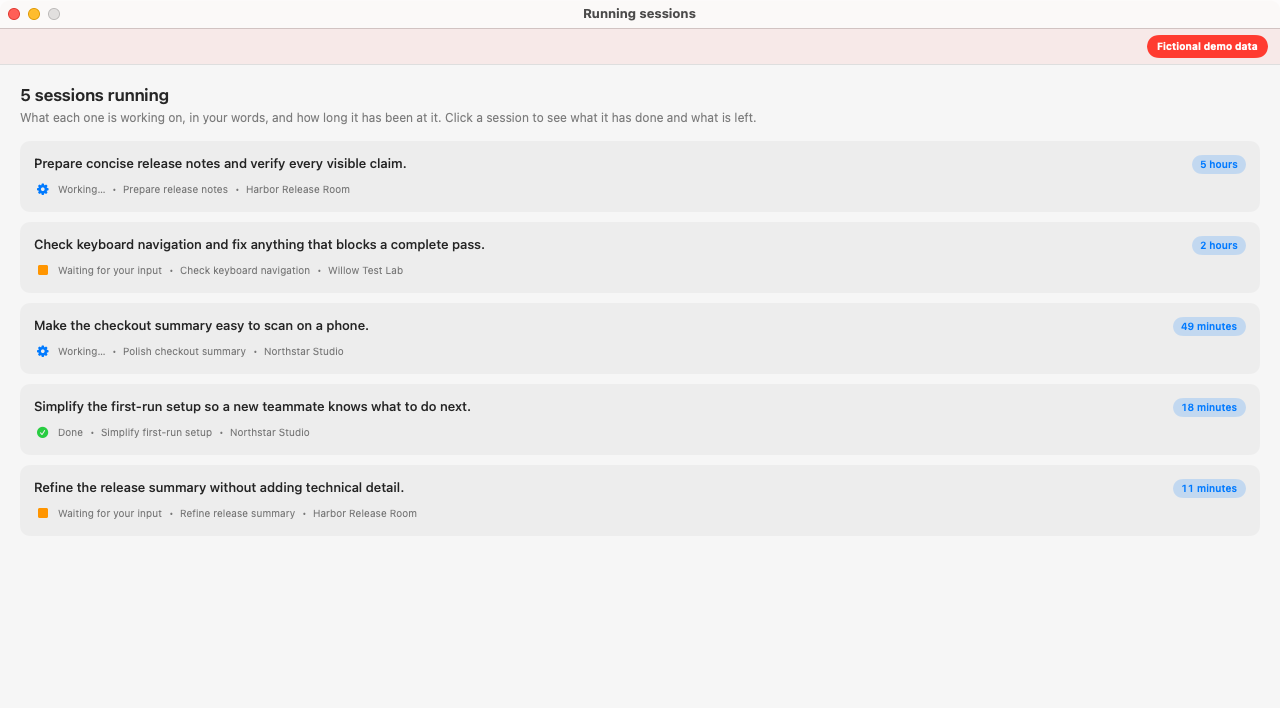
Five example sessions across three servers, with readable goals, status and elapsed time. Mac, build 641 · Fictional demo data. View full size.
Read
The Readable view: a conversation, not a firehose.
Open a session and, instead of raw terminal scrollback, you can read it the way it
actually happened: your prompts, the agent's replies, its progress — clean and scannable.
Renders the session as a chat
Prompts, replies, and images appear as a clean conversation. The spinners, redraws,
and control characters that make terminals unreadable are filtered out.
To-do progress at a glance
When the agent is working through a task list, a progress strip shows how far it's
gotten — without reading a word of the log.
Waiting sessions explain themselves
A session that's waiting on you says what it's waiting for — a summary of the
question, right where you'd answer it.
Numbered questions come with a ready answer
When an agent offers numbered options ("1. merge, 2. hold off…"), iVibecode summarizes
what's being asked and recommends an answer you can apply with one tap — no counting lines
in a terminal.
One tap away on every session
The Readable view is a toggle on each session — and starting with 0.5.0 it opens by default
for new sessions. The raw terminal is always one tap away.
Knows an ended session from a broken link
The Readable view distinguishes "this conversation finished" from "this server is
unreachable" — two very different situations that raw terminals blur together.
Code stays readable
Long code lines scroll sideways inside their block instead of wrapping into mush,
and leftover terminal artifacts are cleaned out of the transcript.
Graceful with plain terminals
Open a session that isn't running an AI agent and the app falls back to the normal
terminal view instead of pretending there's a conversation to show.
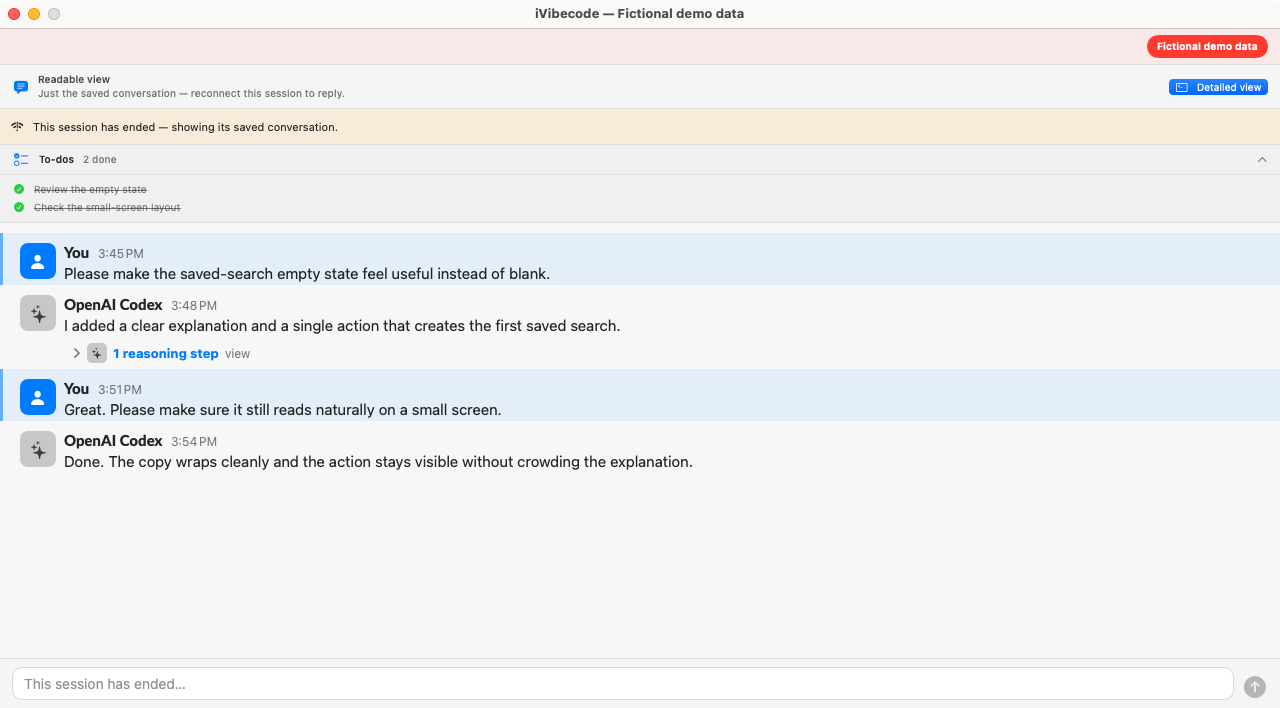
Read a session’s saved conversation after it ends; reconnect before replying. Mac, build 641 · Fictional demo data. View full size.
Steer
Answer, redirect, and queue — from wherever you are.
Watching is half the point. The other half: when an agent needs you, you can handle it
in seconds — from the couch, the train, or another machine.
Reply into any running session
Type a reply and it lands in the running session as if you were at the keyboard —
answer a question, change direction, approve the next step.
Dictate instead of typing Mac
Speak your reply and iVibecode transcribes it into the session, powered by the same
engine behind Expertly Hear.
Type ahead while the agent works Claude Code
Send a message to a busy Claude Code session and Claude's own type-ahead queues it,
then delivers it when the agent is ready — iVibecode shows you the queue so you know your
message is waiting.
The "Waiting for you" surface
Sessions that need you are summarized in one place, with the agent's question and —
when it offered numbered options — a recommended answer you can send with one tap.
Your draft survives wandering off
Start a reply, get distracted, open another session — your unsent text is still there
when you come back.
Paste an image into a reply Mac
Paste a screenshot into a session and the image is transferred to the server with its
path typed in — the agent can look at what you're seeing.
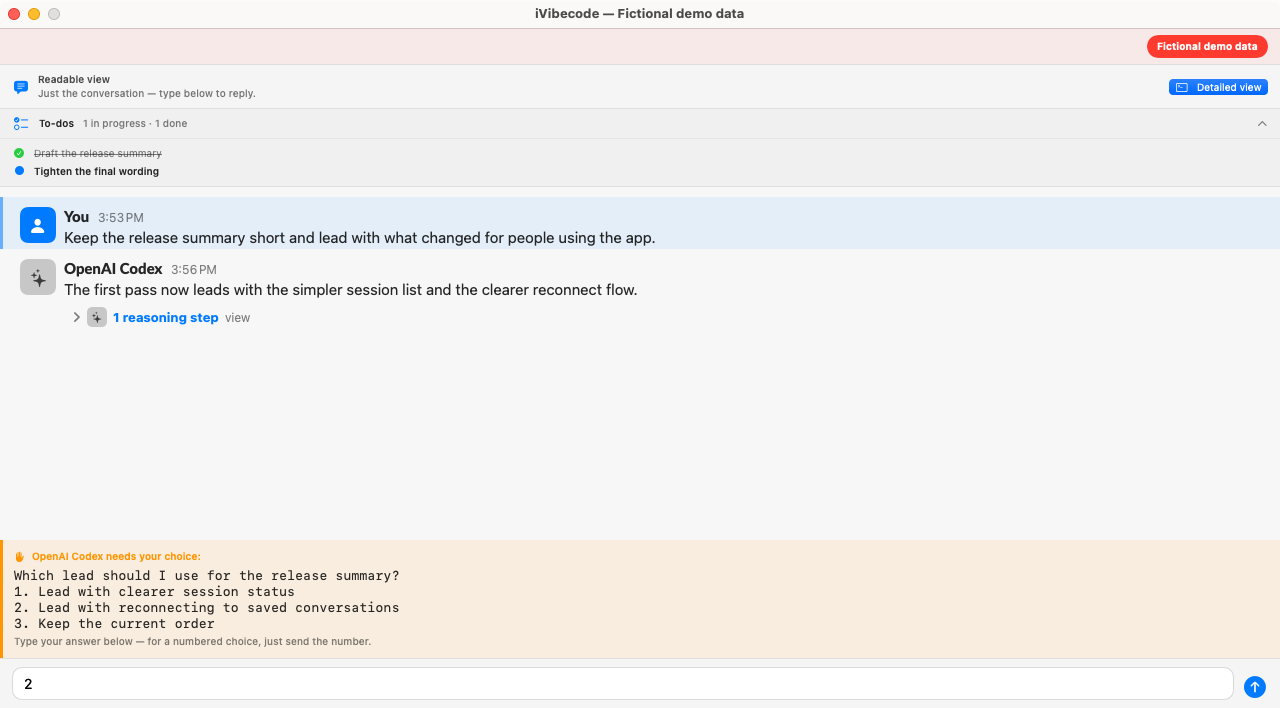
Prepare a reply to an agent’s question in the readable view. Mac, build 641 · Fictional demo data. View full size.
Recover
Sessions come back. So do you.
Laptops sleep, trains hit tunnels, servers reboot, agents exit. iVibecode treats all of
that as normal weather, not a crisis.
Reattaches after sleep and drops
When the connection drops — even right as a session is starting up — the app keeps
retrying and brings it back on its own. Stale "reconnecting…" banners clear the moment
the link is healthy again.
Reopen ended conversations
A conversation whose session has ended isn't gone: iVibecode lists recoverable
conversations and can resume one into a fresh session, picking up where it left off.
Every agent resumes its own conversation In 0.4.28
Claude, Codex, Gemini, and Qwen sessions each reconnect to their own real conversation
after a drop — through the right tool for that agent — instead of coming back as a blank
new session.
Sees what happened before you arrived
Attaching to a session where the agent already exited recovers the recent shell
history above the live prompt, so you can see what it did last instead of a blank pane.
Dead rows clean themselves up
Sessions that have genuinely ended disappear from workspaces and lists automatically —
you're never clicking rows that only error.
Rolling backups of your setup
Your servers and workspaces are backed up on a rolling basis, and a damaged saved-server
entry costs you that one entry — not your whole server list.
Organize
Ten sessions, zero chaos.
Group, find, and lay out your sessions the way you think about the work — and have it
all still be there tomorrow.
Workspaces that survive restarts
Create named workspaces for a feature, a client, a fire drill. Drag sessions between
them. Quit the app, reboot the server — the workspaces are still there.
Favorites and Recently Used
Pin the sessions you keep coming back to, and let the recents list catch everything
else — ordered by the last time a human actually did something in them.
Workspaces open the way you'd expect
Open a workspace with one session and it fills the pane; a workspace with several shows
them as a clean list of large rows, each one tap from its full-size terminal.
Popped-out windows come back
Open sessions in their own windows, arrange them across displays, and relaunch — the
windows are restored where you left them.
Find across everything
Search open sessions, past conversations, or both — with live match counts across
sessions. Jump straight from a search hit into the session, or open the result in its
own window.
Compress what's just humming along
Collapse an actively-working session down to its title bar to reclaim space; typing
into a compressed window expands it again automatically.
Connect
Plain SSH. Your keys. Nothing installed on the server.
iVibecode's whole security story is that it doesn't add anything: no server agent, no new
open port, no relay in the middle. Your repositories stay on your servers — iVibecode
connects over SSH and never copies your repositories. Some session text does leave your
device for the AI features — the full list is under "What leaves your device" below.
Several servers at once
Add every box your agents run on — a Mac in the office, a cloud virtual machine, the
big shared development server — and watch them all in one list. Mark one as the default
for the sidebar's new-session button.
Imports your SSH config Mac
Host aliases from your existing ~/.ssh/config auto-fill when adding a
server. iVibecode reads your config; it never edits it.
Guided key setup, password never stored
No key on this device yet? Give the app your server password once — it installs a
device-specific key over that connection and does not keep the password.
Per-device keys, kept private
Each device gets its own SSH key, kept in a private, permission-locked store on that
device. Lose a device, revoke one key — not your whole setup.
Host identity pinning
Servers are verified by their host key, so a machine that suddenly "changes identity"
is flagged instead of silently trusted.
Works wherever your SSH works
Because it's plain SSH, it works over whatever path already reaches your servers —
including private networks like Tailscale or a VPN. Nothing new is exposed to the
internet.
What leaves your device
Session text for AI features. When you're signed in, iVibecode sends
session text to Expertly's AI service: up to the last 200 lines of a session's on-screen
text (which can include code) for the waiting-for-you summaries, suggested replies, and
steering; the messages you typed to an agent, to describe each running session's goal; and
excerpts of a session for automatic naming (on by default) and automatic filing (off by
default), both of which you can switch off in Settings.
Error reports, on by default. The app automatically sends error and
crash reports to Expertly, with passwords, keys, and tokens stripped and server and user
names replaced by placeholders. Turn off "Share error reports with the developers" in
Settings to stop them.
Settings sync. When you're signed in, your tags, saved prompts,
steering prompts, terminal launcher commands, workspace names, and preference switches are
backed up to your Expertly account (Expertly Identity) so they match on every device. Server
addresses, session names, passwords, and keys are not synced.
Dictation. When you're signed in, dictation streams your voice to
Expertly's speech service by default. When you're not signed in, or that connection fails,
Apple's on-device recognizer is used and no audio leaves your device.
Reports you choose to send. A diagnostics report you send from the app
includes your saved servers' addresses and usernames and the recent connection log, never
passwords or key contents. Live Debug, only while you have it switched on, lets Expertly
support see the app's status and logs.
What stays on your device: server passwords (used once, never saved), your SSH keys, and
your Expertly sign-in, which are held in the device keychain and never synced to iCloud.
iVibecode never copies your repositories.
Voice
Talk to your fleet.
Sometimes the fastest keyboard is none at all.
Dictation into any session Mac
Hold to talk, and your words are transcribed into the running session — powered by
the Expertly Hear engine. Long answers stop being a chore. When you're signed in, your
voice streams to Expertly's speech service; otherwise Apple's on-device recognizer is
used and no audio leaves your Mac.
Dispatch by voice Mac
Say what you want done and iVibecode routes the request to the right session — or
kicks off the work — without you hunting through the list first.
Multi-agent
Claude Code, Codex, Gemini, and Qwen — treated as first-class, each.
Most remote tools understand exactly one vendor's agent. iVibecode is built for the mixed
fleet that real teams actually run.
Correct labels, purpose-built parsers
Each agent type is recognized and labeled as what it is — a Codex session is never
mislabeled as Claude. Claude Code, Codex, and Gemini each have their own dedicated parser;
Qwen Code is a Gemini fork, so Qwen sessions ride Gemini's.
Right-tool resume for every agent
When a session drops, each agent is resumed through its own tool into its own
conversation — Claude, Codex, Gemini, and Qwen alike. One honest note: Gemini and Qwen
resume only on servers where their launcher tooling is installed.
One view across vendors
A Claude refactor, a Codex bug hunt, and a Qwen docs pass sit side by side in the
same list, same statuses, same Readable view. You stop context-switching between
vendor-shaped windows.
New sessions with the agent you choose
Start a fresh session on any server and pick which agent runs it — right from the
app.
Updates & diagnostics
Ships often, tells you what changed.
iVibecode updates frequently — see the changelog
for the honest week-by-week history.
Keeps itself up to date Mac
When a new version ships, the Mac app downloads and installs it itself (built on
Sparkle, the standard Mac updater). There's also a manual "Check for Updates" if you
like pressing buttons.
Release notes in plain English
Every update tells you what it fixes in human terms — what was going wrong for you
and what's different now — not commit-log shorthand.
An About panel that answers "which build is this?"
Settings shows the exact build date and version, so "am I running the fix?" takes one
glance to answer.
Error reporting, done honestly
Automatic error and crash reporting is on by default, so we can find and fix problems
fast. Reports have passwords, keys, and tokens stripped and server and user names replaced
by placeholders, and you can turn them off in Settings. When something breaks you can also
send us a diagnostics report by hand.
Platforms
Where it runs today.
Mac — available now
A signed, notarized Mac installer with automatic updates. Requires macOS 15 or newer.
Free during early access. New here? Request access
first — our team will review your request and contact you about setting up access. Already
have an Expertly account? Download the app and sign in.
iPhone & iPad — TestFlight TestFlight
The iPhone and iPad app is in TestFlight early access today, with the App Store
listing pending. Request access
and our team will review your request.
Browser — in development
A browser version that needs no Mac at all is in the works. Not available yet — when
it is, the changelog will say so.
Your servers — anything with SSH and tmux
The watching side needs nothing installed: if your agents run in tmux and you can SSH
in, iVibecode can see them.
The same fleet from your pocket: iPhone shows the sessions, the conversations, and the questions waiting on you.
Small touches
The long tail that makes it feel finished.
Helper keys on iPhone
A touch-friendly bar above the keyboard supplies the keys terminals need — Esc,
arrows, Ctrl — so a phone can genuinely drive a terminal.
Drop files onto a session Mac
Drag a file onto a session and it's uploaded to the server with its remote path typed
in — no manual copying.
Terminal themes
Pick the look you want for the terminal.
A welcome tour that respects your time
A short guided tour explains the core ideas on first launch — and you can re-run it
any time: Help → Guided Tour on Mac, or the About screen on iPhone.
An accurate terminal when you want one
Under the Readable view there's still a real, faithfully rendered terminal — resized
to fit your screen — for the moments you want the raw thing.
Shortcuts everywhere
Keyboard shortcuts are shown in tooltips and menus, so you learn them by using the
app.
Keyboard shortcuts Mac
Shortcut
What it does
⌘N
Start a new session — on the server you're viewing, or your most recent one
⌘F
Find across sessions and past conversations
⌘D
Do Something For Me — describe a task, iVibecode dispatches it
⇧⌘C
Compress the current working session to its title bar
⌘-click
Open any session row in its own window
That's the list. Here's how to start.
Free during early access. Request access first; once you have an Expertly account, download
the Mac app, sign in, and connect a server. Using it with a team? Email hello@expertly.com with
your team size.